
Most campus and office IT teams already have plenty of usage data. Logins, app sessions, machine status and licence counts all build up week after week. The hard part is turning that data into decisions before the next semester, budget cycle or licence renewal comes round. This guide walks through a simple end-of-term review that IT teams can run with CloudDesk vDash. It’s built around five questions, and each one ends in an action.
Why a Regular Usage Review Matters
Lab PCs, shared workstations and licensed software tend to be planned once and then left alone. Rooms that were busy two years ago may be quiet now. A licence pool sized for every installed copy may be far bigger than the number of people who use it at the same time. Some PCs may have been offline for weeks without anyone noticing. A short, regular review turns these blind spots into a to-do list. vDash gathers usage from users, machines and applications and shows it on one online dashboard. That lets you run the review from evidence rather than guesswork.
Question 1: Which Labs Are Busy, Idle or Offline?
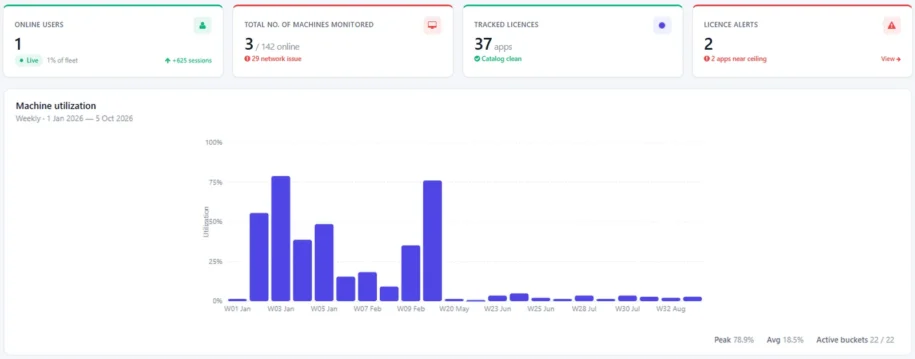
Start with the big picture. vDash shows weekly lab utilisation and lets you rank labs by login sessions, so you can quickly see which rooms are in high demand and which are rarely used.
Actions to consider:
- Move scheduled classes or open-access hours from crowded labs to quieter ones.
- Check whether a rarely used lab needs a different software set, better signage or a new booking arrangement before you write it off.
- Plan maintenance windows for the times and rooms with the least activity.
Question 2: Are We Licensing for Real Demand?
The number of installs and the number of people using an application at the same time are very different. vDash shows peak concurrent licence use per application. You can then size renewals against real demand rather than install counts.
Actions to consider:
- Before each renewal, compare peak concurrent use with the number of seats you hold.
- Flag applications that were installed widely but barely used, and review whether they need to stay on every machine.
- Spot applications that regularly hit their limit, so users aren’t turned away during busy periods.
Question 3: Who Actually Uses Each Application?
Licence costs and support effort are easier to plan when you know who relies on what. vDash breaks down usage by user and department, showing which departments use each licensed app and when.
Actions to consider:
- Share department-level usage with faculty or business-unit heads when you discuss software requests.
- Install specialist software in the labs used by the departments that need it, rather than everywhere.
- Time training or support sessions for the periods when each department uses an application most.
Because vDash lets you create your own groupings of users, machines, applications and licences, you can build the review around your own structure. You can also see filtered or consolidated reporting across multiple business units or campuses.
Question 4: Is Our Asset Register Accurate?
An outdated asset list leads to surprises: PCs that can’t be found, machines that quietly stopped reporting, or warranties that lapsed without notice. vDash keeps a live machine inventory, so you can spot stale, offline or incomplete PCs at a glance. It also tracks warranty and support expiry per PC.
Actions to consider:
- Investigate machines that have been offline for a long time. Are they faulty, moved or retired?
- Fill in missing asset details so audits and refresh planning are based on complete records.
- List the PCs whose warranty or support ends in the next term and plan renewals or replacements early.
Question 5: What Happened When Something Went Wrong?
When a user reports a problem, or you need to understand how a lab PC was used, vDash can trace user activity end to end, from logins to application sessions. This helps the support team answer questions with facts rather than assumptions.
Actions to consider:
- Use activity history to confirm when and where an issue happened before you escalate it.
- Look for repeated patterns, such as the same machine or application, that point to a root cause worth fixing once.
Turning the Review into a Habit
The value comes from doing this regularly, not once. A simple routine works well for most teams:
- Weekly: glance at the dashboard for live users, fleet health and licence alerts.
- Monthly: review lab rankings and offline machines, and fix what you find.
- Each term or quarter: run the five questions above and record the decisions you made.
- Before renewals: pull peak concurrent use and department usage for each licensed application.
vDash is cloud-based and multi-tenanted, so authorised staff can open the same dashboard from anywhere, even across several buildings or campuses. That makes it easier to share the findings with management and finance.
From Data to Decisions
This is what we mean when we call vDash AI-enabled analytics: it turns the lab, licence and asset usage data it collects into decisions you can act on. The five questions above are a practical way to put those insights to work, whether you manage university computer labs or shared PCs in an office.
If you also look after the lab PCs themselves, read how lab technicians reset and patch a whole lab from one vDesk golden image, and use these usage insights to keep that image lean.
Try It on Your Own Labs
The best way to see what your usage data says is to look at it. CloudDesk offers a free 2-week pilot of vDash, so your team can run this review on your own labs and machines.