
Turbo VDI: run lab applications on any device, in a browser
Turbo VDI is an application virtualisation and streaming platform by our partner Turbo.net, delivered and supported in Malaysia by CloudDesk. Each application runs in its own isolated container and streams to students and staff over HTTPS, with no traditional installation on their PCs.
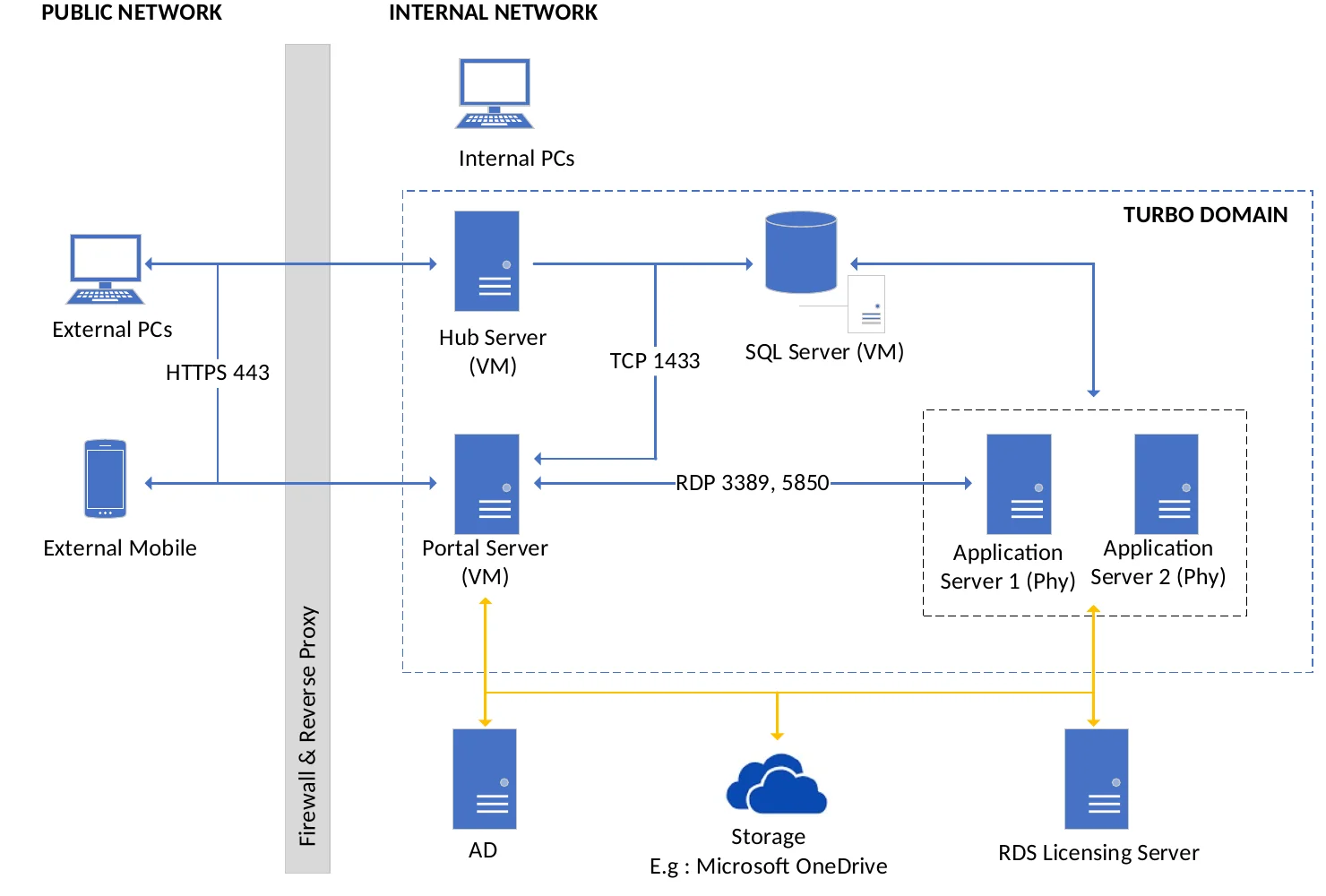
How it works
- Package – Turbo Studio wraps each app in its own container.
- Store – Turbo Hub holds app images and assigns them to Active Directory groups.
- Deliver – portal and application servers stream apps over HTTPS.
- Use – in the browser, in an RDP window, or locally on Windows.
Three ways to launch
| Launch mode | What it means |
|---|---|
| Browser (HTML5) | Any device, zero install. Suits Chromebooks and tablets. |
| Windowed (RDP) | A full remote session. |
| Local (Windows) | Downloads on first launch and uses local resources. |
Why IT teams choose it
- App versions run side by side without conflicts.
- Updates are server-side, with no reimaging.
- Active Directory-integrated single sign-on.
- One central Hub for all app images.
- Works on campus PCs and students’ own devices.
- Cloud storage options: OneDrive, Google Drive and Dropbox.
What you need
Active Directory, an SSL certificate, Windows Server and RDS licensing, and server capacity sized to your app mix and concurrent users. CloudDesk scopes this with you. Typical implementation takes about 4 weeks: planning, infrastructure, installation, app packaging, then pilot and go-live.
Measure it with vDash
vDash shows how much application use already runs on VDI versus physical labs.
Frequently asked questions
What is Turbo VDI?
Turbo VDI is an application virtualisation and streaming platform by our partner Turbo.net, delivered and supported in Malaysia by CloudDesk. It runs lab applications from the server and streams them to students and staff on any device.
Do students need to install anything?
Not for browser launch: apps run in HTML5 in any modern browser with zero install. The optional local launch on Windows downloads the app on first use.
Which devices are supported?
Any device with a modern browser, including Chromebooks and tablets, through HTML5 launch. Windows PCs can also use a full RDP window or local launch.
How long does implementation take?
Typically about 4 weeks: planning, infrastructure, installation, app packaging, then a pilot with internal users before go-live.
How is it licensed?
Turbo VDI is licensed by subscription. Contact us for a scoped proposal.
Request a proof of concept
Tell us your app list and expected concurrent users and we’ll scope a proof of concept.